
Live channels
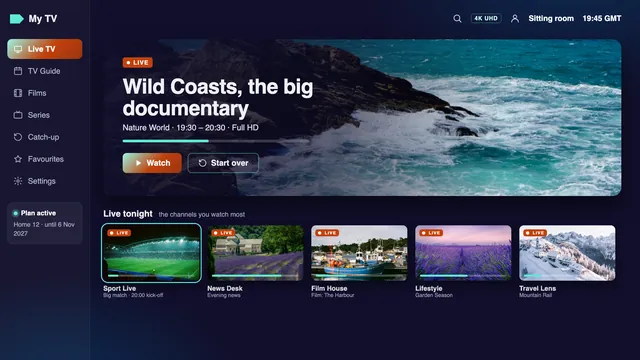
40,000+ channels playing as they air, sorted country by country and split into categories. Ireland’s groups open the list.
IPTV explained · then one plan in euro · login in 2 min
IPTV is television that comes down your broadband line rather than from an aerial on the roof, a dish on the wall or a cable under the street. Below, it is explained the way a good reference book would: what there is to watch, how a picture gets from a server to your screen, what an IPTV login contains and which player opens it. After the explaining, one thing to order: a Home plan, paid once in euro, with 40,000+ channels live and 120,000 titles on demand.

4 stepsfrom login to picture
Definition6 Nov 2026
iptv/ˌaɪ.piː.tiːˈviː/noun
Television sent over the internet: live channels, a 7-day guide, catch-up and films on demand, opened in a player app with a login.
How it reaches you
Home 12, paid once€49Loginin 2 min
Order Home 12Picture depends on each source: HD, Full HD, or 4K when the source is 4K.
Plays in these apps



Start here
Behind this page is IPTV, an independent business based in Dublin that sells IPTV plans online to Irish households. Every plan has a fixed length and an end date. We sell them, and we explain how they work before asking you to choose. The player apps are made by other companies, we sell no boxes or sticks, and we rank nobody, ourselves included.
The sections run in the order questions usually come up. First, what IPTV actually is, and how it differs from the aerial, the dish and the cable box. Next, the route a picture travels from a server to your sofa, the login message and its two formats, the player that suits each kind of screen, and the speed your line has to hold. The four Home plans, and how ordering works, come after all that.
Know how IPTV works already and only want a price? Jump straight to the plans from the list below. Otherwise, the first seven sections are about twenty minutes of reading, and they will make the rest of this page, and any other IPTV offer you look at, a good deal easier to weigh up.
IPTV explained
Strip away the jargon and IPTV is one idea: the picture comes down your broadband line on request, instead of through the air or along a cable.
The letters stand for Internet Protocol television. Internet Protocol is the shared language connected devices use to move data around in small, addressed packets. IPTV is simply television carried in those packets, along the broadband line that already brings email, web pages and video calls into the house.
For decades, pictures reached Irish sitting rooms by one of three routes. A roof aerial pulled a signal out of the air from a transmitter on a hilltop. A dish bolted to the gable caught a signal sent down from a satellite. A cable laid under the footpath fed a box beside the television. All three are broadcasts: the same channels flow to every house at once, and your TV or box tunes in to one of them.
IPTV turns that around. Nothing goes out to everyone. When you choose a channel, the player app asks a server for that one stream, and the server sends it to your home alone, over your broadband. Choose another channel and the app requests another stream. Because each picture is fetched on request, the same line can also bring back a programme from Tuesday or start a film from a library, which no aerial on a chimney could ever do.
| Route | How the picture arrives | What the home needs | What usually limits it | What you can watch |
|---|---|---|---|---|
| Roof aerial | A radio signal through the air from a transmitter | An aerial pointed at the mast, and a TV with a tuner | Distance, hills and weather between house and mast | Live channels; anything more needs a recorder |
| Satellite dish | A signal sent down from a satellite in orbit | A dish aimed at the satellite with nothing in front of it, a cable and a receiver | Heavy rain, or a tree or extension blocking the view of the satellite | Live channels; catch-up only with a recording box |
| Cable | A signal along a cable laid under the street | A cable connection to the house and the operator’s box | Whether the network passes your street at all | Whatever the operator’s box offers |
| IPTV | Packets of data over your broadband, one stream per screen | A player app on a television, stick, phone or laptop, plus a login | How steady your line stays at the busiest hour | Live channels, a 7-day guide, catch-up and films on demand |
None of this makes IPTV better than an aerial in every house, only different. Once an aerial is up, it costs nothing to run, but it carries only what is broadcast in your area, and only live. IPTV needs a steady line and a login; in return it brings channels from many countries, a guide, catch-up and a film library to any screen that can run a player, in any room the Wi-Fi reaches.
Watch films through an app on your TV and you are already using video over the internet; strictly speaking, that is IPTV as well. In everyday use, though, the word means something narrower: live television channels with a programme guide and an archive, opened in a player app with a login. That is how the word is used here.
Some broadband packages also include a TV box that runs over the company’s own network. An engineer would call that IPTV too, but it is bound to that company’s line and that company’s box. A plan like ours travels over the open internet to any compatible player, whoever supplies the broadband.
IPTV is not a box, an app or a channel. A stick or a box only helps a screen that cannot run a player by itself. The app is just the player, an empty window until you sign in. Channels, guide and library all arrive with the login, which is why one IPTV login can open on the sitting-room TV tonight and on the kitchen laptop next week, with nothing new to buy.
What you watch
An IPTV plan is more than a list of channels. The guide, the archive and the library are what change how an evening in front of the TV works.
40,000+ channels playing as they air, sorted country by country and split into categories. Ireland’s groups open the list.
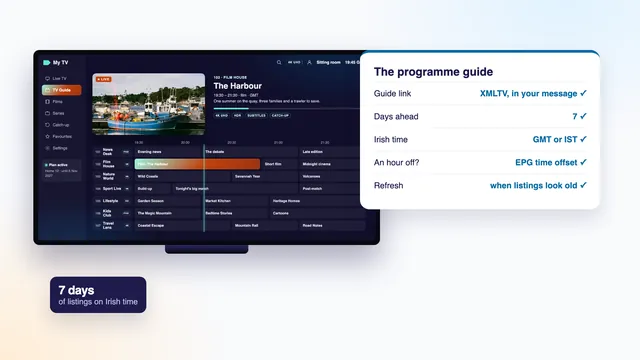
A grid of what is on now and for the week ahead. It comes with the IPTV login and keeps Irish time.
Where a channel stores an archive, the last week or so, up to 7 days, replays straight from the guide.
120,000 films and series with no schedule. Most are in English; the rest carry subtitles.
With an aerial, live is nearly the whole story, unless someone remembered to record. An IPTV player sets four ways of watching side by side on one home screen, all worked from the same remote.
Live channels are the part of IPTV closest to ordinary television: they play as they are broadcast. Ours are grouped by country first and category second, so the list starts on the Irish groups rather than a jumble of 40,000 names. Most homes settle on a short favourites list and rarely scroll past it.
The guide is the grid telling you what is on. You will often see it called the EPG, short for electronic programme guide. It comes as a separate data file in a format named XMLTV, which lists every programme on every channel with its start and end time. The IPTV player lines that file up with the channel list and draws a grid seven days deep.
Catch-up exists because the IPTV server keeps a copy of what some channels have shown over the past few days, usually up to 7. Scroll back in the guide to something that has already aired and press play. Channels with no archive are live only; many players put a small symbol next to the ones that do keep one.
On demand, usually shortened to VOD (video on demand), is the library: 120,000 films and series stored as files rather than broadcast as channels. Nothing starts at a fixed time. Press play when it suits, pause for the kettle, and most players pick up where you stopped.
The path of a picture
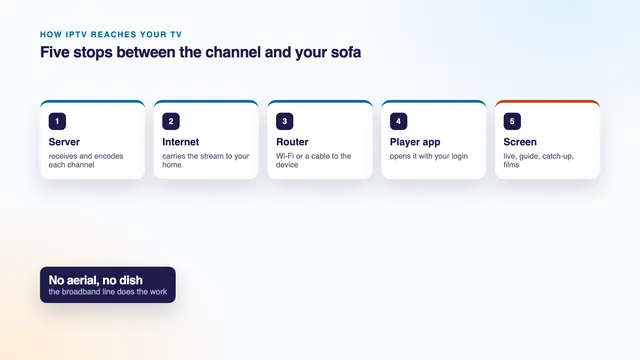
From server to screen in four stops. None of it calls for an engineer, but each stop explains something you will see on the TV.
Stores the channels, the library and the guide, and sends out each stream at the quality its source was made in. At busy hours the work is split across more than one server.
The stream crosses the internet as packets and comes in on your own broadband, whatever kind of line the house has.
Passes the stream on to the screen, by network cable or by Wi-Fi. A cable, or the 5 GHz band at short range, keeps it steady.
The IPTV player signs in, rebuilds the picture from the packets and shows it on the TV, stick, phone or laptop.
Four stations between the server and the sofa. When a picture stalls, it has stalled at one of them.
Every IPTV picture makes the same short trip. Knowing the four stops pays off later, because a picture that stops has stopped at one of them, and each one has its own remedy.
An IPTV player never shows a stream the moment it lands. It holds back a small reserve, a few seconds’ worth of picture called the buffer, and plays from that while the next packets arrive. As long as packets come in at least as fast as the picture plays, you notice nothing. When they come in more slowly, the reserve drains, the image freezes and a spinning circle appears. That freeze is what people call buffering.
Most IPTV pauses start at the home end of the chain. Typical culprits are a Wi-Fi signal that has crossed two walls, a line that slows when the whole estate gets home from work, a router stuck on the crowded 2.4 GHz band, or a device too old to decode HEVC, the compression 4K pictures rely on. Others start at the far end, when servers are under heavy load between about 19:00 and 23:00. Demand peaks then, and peaks hardest on Saturday and Sunday evenings and on the nights of big matches. We run several servers so the load is shared at those hours, and we promise nothing more than that.
Packing a picture into packets, sending them across the country and filling the buffer all take time. As a rule a live channel over IPTV trails the broadcast by a few seconds, and on some channels by as much as half a minute. If the street cheers a goal before you see it, that is the delay; nothing is broken.
A raw 4K picture is far too heavy to send as it is, so it is compressed, usually with a method called HEVC, also known as H.265, which stores mainly what changes from one frame to the next. Your device rebuilds each frame from that. A device with an HEVC decoder in its chip copes easily; one doing the work in software struggles. That is why an older stick can play HD IPTV smoothly and still stumble over a 4K film.
Frame rate matters too: it counts how many pictures a second a stream shows. Films are mostly made at about 24 or 25 frames a second. Live sport looks smoother at 50, and our IPTV channels carry sport at 50 when the source provides it.
The login
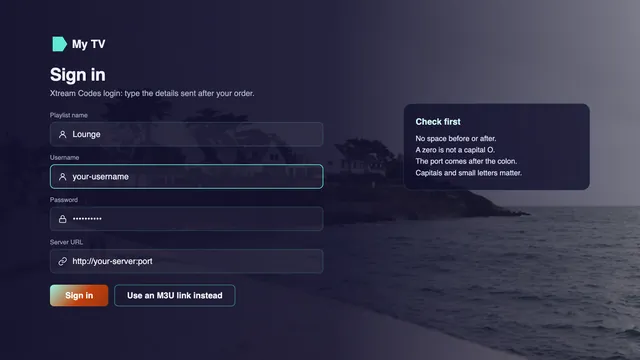
No account to open with us and no app of ours to install. Your IPTV access is a short message, and it carries everything a player needs.
Once the payment clears, a single message follows, 2 minutes or so later and at any hour, sent by WhatsApp or email. It holds four things, and every IPTV player you might use needs at least one of them.
Keep the IPTV login message where you can find it again. If you change TV, reset a stick or add a phone, the same details go in again.
Your login message, 2 minutes after payment
Blurred here; the real details are sent to you alone.
| Xtream Codes (three fields) | M3U (one link) | |
|---|---|---|
| Typing it in | Username, password and server URL, each short | A single long web address |
| The guide | Comes in with the login, no extra step | Some players want the guide link as well |
| Catch-up | Marked in the guide on channels that have an archive | Up to the player; often absent |
| Films and series | Placed in sections of their own | Up to the player; sometimes mixed in with channels |
| With a TV remote | Quick, because each line is short | Easier pasted on a computer or a phone |
| Suits | Most TV apps, sticks, boxes and phone players | VLC, Kodi, and TV apps that fetch a playlist from their website |
A simple rule: where Xtream Codes is on offer, choose it, and save M3U as the fallback for any player that takes nothing else, such as VLC on a computer or a TV app that fetches its playlist from a website. Both open the same IPTV channels. Xtream Codes simply tells the player more, so the guide, the archive and the film library each end up in the right place.
The server URL begins with http:// and usually finishes with a colon and a port number, shaped like http://your-server:port. Copy it exactly, with no stray space at either end. Usernames and passwords are case-sensitive, so one capital typed as a small letter is enough to fail. With a TV remote, take it slowly and read every line back on screen before you press the sign-in button.
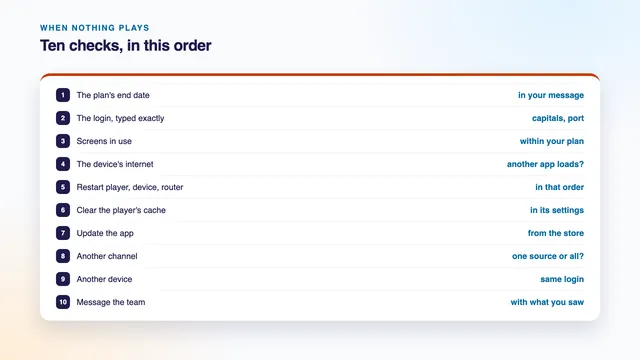
When an IPTV player shows an error, the number usually hints at the cause. A 401 or a 403 usually means the server refused the login, most often because of a typing slip, a wrong URL or a plan past its end date. A 404 usually means the address itself is wrong. Not sure? A photo of the error, sent on WhatsApp, lets the team read it with you.
Your IPTV login is for the people you live with. Sharing it with another address, or posting it publicly, can get it suspended.
Players and screens
Choose your screen to see the player that suits it. Every player listed accepts the login you receive, so a new TV later never means starting again.
For 4K HDR where the source has it, Amazon’s 4K models are the ones to have: Cube, Stick 4K Max or Stick 4K. The Lite and older basic sticks top out at Full HD.
Smarters Pro is missing from Amazon’s Appstore, so the route is « Downloader », an Appstore app by AFTVnews. Next, open Developer options (Settings › My Fire TV) and switch on « Install unknown apps » for it. The player’s link comes with your login.
If it is hidden, open About in Settings › My Fire TV, then click on the stick’s own name 7 times; the menu unlocks.
A few recent Amazon sticks run Vega OS, and Vega OS takes apps from the Appstore alone. Look the model up before you buy one for IPTV.
A set or box running Google TV or Android TV gets its players from Google Play, Smarters Pro and TiviMate included.
A guide-led player for Fire TV and Android TV. It costs nothing to install; its premium options are extra, at prices that vary by store.
Insist on Google TV or Android TV certification: it keeps Google Play and the security patches coming. Then check for 4K at 60 Hz, hardware HEVC, at least 2 GB of RAM, a wired network socket and 5 GHz Wi-Fi.
An app file picked up on a forum may hide malware. Install from the store instead; store apps keep themselves up to date as well.
Smarters Pro appears in the Samsung (Tizen) and LG (webOS) stores on some models and in some countries, not on every set.
Needs a single activation for each TV. The M3U playlist is sent from its website along with the TV’s MAC address, and the set picks the list up.
Links your playlist to a device key or the MAC address of the set. Its maker charges an activation fee of its own, by the year or for life.
Sets older than roughly 2018 can miss out on current players. Give them a stick or an Android box on HDMI and they work as IPTV screens again.
Players install through the App Store, the only route on Apple TV. A 4K model shows 4K HDR when the source has it.
Open Match Content, in Settings › Video and Audio. « Match Frame Rate » helps sport and « Match Dynamic Range » helps HDR films; turn both on.
The real Smarters Pro lists Tech Smarters Private Limited as developer. Downloading costs nothing; the in-app « Premium » upgrade is your choice, priced by each store.
Apps with very similar names exist. Check who made an app before installing it.
Free for Windows, Mac, Android and iOS. Paste the M3U link into its network-stream option and the channels load as a playlist.
Add « PVR IPTV Simple Client » from its add-ons, then give that add-on the M3U link and the guide link.
A Mac with Apple silicon can run the App Store version of the player.
A laptop on an HDMI lead to the TV does for a film night, though a stick or a TV app is handier day to day.
Think of the player as the window and the login as the view. Any compatible IPTV player will do: Kodi, VLC, TiviMate, XP IPTV, IBO Player, Smart IPTV and IPTV Smarters Pro all accept our details. We have no app of our own and no hardware to sell, so the advice here always starts from the screen already in your house.
Installed on several screens. Put the player on the TV, a phone and a laptop, and type the same details into each. What counts is how many play at once: one at a time on Home 3, Home 12 and Home 24, two together on Home 12 Duo.
When the TV has no good player. If the television’s own store has nothing you trust, a streaming stick in the HDMI socket does the job, and it moves to the next TV when you replace this one. A box adds nothing to the channels; whatever device you use, the access is the login.
Paid extras inside players. Several players are free to install and sell optional extras, or charge an activation fee per TV. Those fees are set by the app makers and paid to them. IPTV has no link with any player and earns nothing from them.
Your line
IPTV asks one thing of the house: a line that holds steady. Plan on 5 Mb/s per HD screen, twice that for Full HD, and 25 Mb/s wherever a screen shows 4K.
| Picture | Steady speed per screen | Pixels | What the screen needs |
|---|---|---|---|
| HD | 5 Mb/s | 1280 × 720 | Works on every screen in the house |
| Full HD | 10 Mb/s | 1920 × 1080 | A Full HD set or better; the ceiling for Lite and basic Fire TV sticks |
| 4K UHD | 25 Mb/s | 3840 × 2160 | A 4K TV and device on HDMI 2.0 or later, with hardware HEVC (H.265) |
| Two screens in Full HD on Home 12 Duo | 20 Mb/s | 1920 × 1080, twice | Two devices playing together |
| One 4K and one Full HD on Home 12 Duo | 35 Mb/s | Both levels at once | Wire the 4K screen to the router |
For IPTV, the figure that matters is the one your TV sees on a weeknight evening, not the one in the broadband advert. A line sold as fast can still sag at nine o’clock, and it is the sags that decide the picture.
Run a speed check in a browser or speed app on the TV, stick or box itself, some time after seven in the evening, and note the lowest reading, not the highest. A phone right beside the router gives a rosy figure; the stick behind the TV, two rooms away, is the device that has to cope.
A network cable between router and TV is the most stable connection IPTV can have. Where no cable will reach, join the 5 GHz Wi-Fi network and keep the TV or stick no more than a room away from the router. The older 2.4 GHz band gets through walls more easily but carries less, and in towns it is crowded by every neighbour’s router.
Full fibre to the home now reaches most towns and a growing share of rural houses. With fibre to the cabinet, the speed drops as the distance from the street cabinet grows. Fixed wireless comes from a mast and needs a clear line of sight to it. A 4G or 5G home router depends on its signal and on how busy the mast becomes after dark. Every one of them can carry IPTV; what differs is how far up the picture levels each one reaches on a busy evening, which is why a farmhouse on fixed wireless may settle for Full HD while a flat on full fibre makes use of 4K.
4K takes a chain of four: a 4K television, a 4K device in an HDMI 2.0 (or later) port, a player with hardware HEVC decoding, and roughly 25 Mb/s that holds up. Should one link fall short, the player steps down a level or stalls. HDR and Dolby Atmos depend on the source carrying them, and on the player and the TV both handling them.
Each IPTV channel and each title comes in at whatever quality its source has: some in HD, many in Full HD, and those made in 4K in 4K UHD. A 4K television cannot turn an HD channel into 4K, and no plan can either. That is also why we never quote a count of 4K channels.
Glossary
Ten words that come up whenever IPTV is explained, each in plain English.
Internet Protocol television: live channels, a programme guide, catch-up and films carried over the internet to a player app, rather than by aerial, dish or cable.
Three fields (username, password, server URL) that most IPTV players ask for. One such login fills the channel list, the library and the guide.
A playlist format: a plain text file listing channel names and stream addresses, opened from one link. VLC, Kodi and many TV apps read it.
Electronic programme guide: the grid of what is on now and over the next 7 days, drawn from an XMLTV link.
Programmes that have already aired, kept on IPTV channels that have an archive, usually for up to 7 days, and started from the guide.
Video on demand: the library side of an IPTV plan, films and series that start when you press play, with no timetable.
High Efficiency Video Coding, also called H.265. 4K streams depend on it, and a device needs a hardware decoder to keep up.
Pictures per second. Sport at 50 frames per second moves more smoothly than at 25, when the source supplies it.
A pause while the IPTV player waits for more of the stream, usually down to Wi-Fi, an overloaded evening line or a busy server at peak time.
A player setting that moves the whole guide by an hour or more when its times disagree with the clock on the wall.
An honest seller
This site explains IPTV and then sells one kind of plan. Here is where the explaining ends and the selling begins.
Search for IPTV and the results split into two camps. In one, sellers whose pages say next to nothing about how it works. In the other, explainers that tell you everything and sell nothing. This page tries to be both, in that order, and a seller wrote it. You ought to know that before reading anything we say about our own plans.
IPTV sells fixed-term IPTV plans. A seller cannot also be the referee, so we hold ourselves to a few rules:
Whoever you are thinking of paying for IPTV, us included, these are moments to stop and ask before any money moves:
The going rate. At the time of writing, IPTV offers seen online in Ireland ask roughly €10–15 for one month, €24–29 for three, €44–45 for six and €59–75 for a year on one screen, and about €100–130 for a year on two screens. Prices vary by seller. « Lifetime » offers exist as well, without an end date and without any guarantee on paper.
For your rights when buying anything online, Ireland’s Competition and Consumer Protection Commission, the CCPC, has guidance for consumers. Ten minutes with it is time well spent before paying any seller, and the same questions work for every IPTV offer you compare.
Home plans
Home 3, Home 12, Home 12 Duo and Home 24 are built from the same channel list, library and picture levels. Only the months and the screens change, and none of them renews.
3 mo
Short
Three months to settle in
€29.00
€9.67 each month, averaged
Three months in a single payment
Plays on one screen at a time
Refunded within 7 days if nothing works
Get Home 3One euro payment, no renewal
The plan most homes take
12 mo
Most homes
A whole year, one payment
€49.00
€4.08 each month, averaged
€67 below 4 × Home 3
Plays on one screen at a time
Refunded within 7 days if nothing works
Order Home 12One euro payment, no renewal
12 mo
Two TVs
Two rooms watching at the same time
€79.00
€6.58 each month, averaged
€153 below 8 × Home 3
Plays on two screens together
Refunded within 7 days if nothing works
Get Home 12 DuoOne euro payment, no renewal
24 mo
Longest
Two years, the lowest monthly cost
€89.00
€3.71 each month, averaged
€143 below 8 × Home 3
Plays on one screen at a time
Refunded within 7 days if nothing works
Get Home 24One euro payment, no renewal
| Plan | Last day if ordered 6 Nov 2026 | Months | Screens | Price | Per month | Per day | Good for |
|---|---|---|---|---|---|---|---|
| Home 3 | 6 February 2027 | 3 | 1 | €29 | €9.67 | 32 cent | A few months, a season, or a new TV |
| Home 12 | 6 November 2027 | 12 | 1 | €49 | €4.08 | 13 cent | A single TV for twelve months: the plan most homes take |
| Home 12 Duo | 6 November 2027 | 12 | 2 | €79 | €6.58 | 22 cent | Two rooms, two different programmes |
| Home 24 | 6 November 2028 | 24 | 1 | €89 | €3.71 | 12 cent | A settled home, the lowest cost per month |
The plan most homes take. Home 12 buys twelve months of IPTV on one screen for €49 in a single payment: €4.08 a month across the year, or about 13 cent a day. Four Home 3 plans back to back would cover the same year for €67 more.
Two rooms at once. With Home 12 Duo, two screens can run side by side for twelve months, for €79. Check first that the line has room for both pictures: about 20 Mb/s when both are in Full HD, 35 when one is in 4K.
A short stretch. Home 3 gives you three months for €29. Its monthly cost is the highest of the four, so it fits a season, a rented flat or a first few months of IPTV on a new TV.
Two years. Home 24 costs €3.71 a month spread over its two years, less than any other plan here, and suits a household whose screens and IPTV player are already sorted.
Inside, all four are one IPTV plan: 40,000+ channels, the 120,000-title library, the same picture levels and the same guide. You will not find a monthly rolling plan, a one-month or six-month plan, or anything above two screens. Each plan simply lapses on its end date, and coming back later is a fresh order.
Sport
Match day is when a home line is busiest and patience shortest. Here is what to expect, and what helps.
 Match day, and every line in the estate is busy
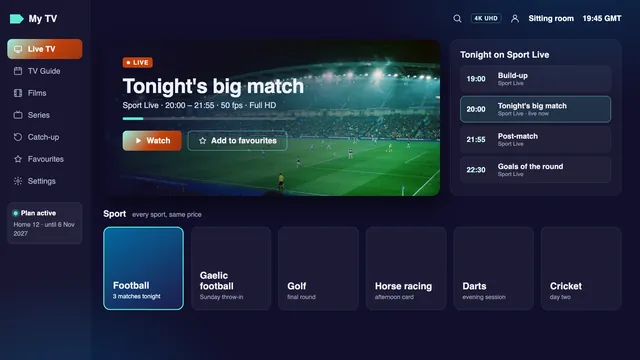
Sport asks more of IPTV than anything else on the list. Big crowds watch at the same moment, home lines are at their busiest, and nobody wants a phone to give away the score before the TV shows it. A few facts help set expectations before the throw-in.
Smooth movement. Where the source supplies it, sport is carried at 50 frames a second, which keeps a fast ball or a sprinting winger crisp. On Apple TV, turning on « Match Frame Rate » lets the television receive that rate as it is, with no conversion.
Where to find it. Irish sport groups sit within the Irish part of the IPTV channel list, right at the top; the general sport groups come further down. Hurling, camogie and Gaelic football, rugby, football, golf, horse racing, tennis, boxing, snooker, darts, cricket and motor racing each have a place. This site names no channel and no competition, so if one fixture is the reason you are ordering, ask us about it first.
The seconds behind live. The delay described earlier applies here more than anywhere. If a text from a friend arrives before the score changes on your screen, the stream is simply running its few seconds behind.
Big nights. The evening peak described above is at its sharpest on weekend nights and on the night of a big game. Our IPTV servers share that load. At your end, wire the main TV if you can, and stop downloads, game updates and photo backups before the start.
Two games at once. If one room wants the hurling and another the rugby, Home 12 Duo covers both screens together. Home 3, Home 12 and Home 24 stream to one screen at a time.
Films and series
Start any title when it suits you. A good film night comes down to finding something quickly and seeing it as it was shot.
 Friday film, at home
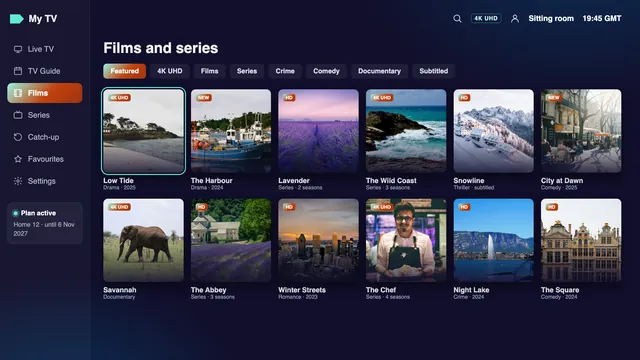
120,000 films and series make up the library. English dominates; titles in other languages come with subtitles. They live in their own section of the IPTV player, apart from the live channels, and keep no timetable: start one at eleven at night, stop halfway, and carry on tomorrow if your player remembers your place.
Finding something. Search the IPTV library by title, browse by category, and open a series to see its seasons and episodes in order. While a title plays, the player’s options show which soundtracks and subtitles it carries.
Picture and sound. A film produced in 4K plays in 4K UHD, 3840 × 2160, when your line, your device and your TV can all handle it; the rest come in HD or Full HD, depending on how they were made. HDR (high dynamic range, which keeps more detail in the shadows and the bright highlights) and Dolby Atmos sound come only when the title carries them, and only if the player and the set can reproduce them. On an older set the same film still plays, without the extras.
Kinder to a modest line. A film is a stored file, so the player can read a little ahead of the scene you are watching, which makes on-demand titles more forgiving than live IPTV channels on a slow line. If a 4K title stutters all the same, choose a Full HD version where the library has one.
Family viewing
Cartoons, news, films and the channels of the country your family comes from, in a list that opens in a sensible order.
 The whole house: cartoons, news and a film for later
A family uses IPTV in a different rhythm from a sports fan: cartoons before school, the news at six, a film on Friday and a documentary on a wet Sunday afternoon. What helps most is a list that opens in a sensible order and a guide even the children can follow.
The order of the list. The live list is arranged by country first, then by category. Ireland opens it with its national, regional and Irish-language groups, and Irish news, sport and entertainment follow. Next come the UK groups, then groups for sport, films, kids, documentaries and music, and finally the world groups by country and language. For many homes with family roots abroad, those world groups are the reason to have IPTV in the first place.
A corner for the kids. The kids’ groups, and the family titles in the library, sit apart from everything else. Many players have a parental lock in their settings; where yours does, set a PIN and hide the groups or library sections you would rather the children skipped.
Favourites save scrolling. In the IPTV player on each screen, mark the channels the house really watches. A dozen favourites are quicker to use than 40,000+ channels, however tidily sorted.
Two screens on busy evenings. When the sitting room is taken, Home 12 Duo lets a second TV or a tablet play something else at the same time. Every IPTV plan is for one household, meaning the screens under your own roof, not a relative’s house across town.
Guide and catch-up
A guide that keeps the time you live by, and an archive that lets the week’s programmes wait for you.
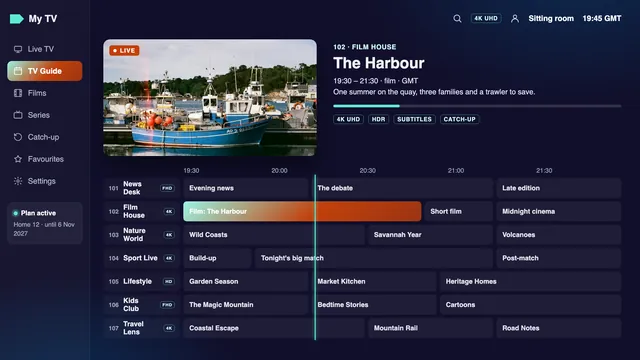
The listings travel with the Xtream Codes login, so most players draw the IPTV guide with no extra step, seven days ahead. It follows the Irish clock: GMT in winter, Irish Standard Time (IST) in summer. Summer time begins on the last Sunday in March and ends on the last Sunday in October. Today, 6 November 2026, the clock is on GMT, and the next changes come on these dates:
| Date | Change | Guide from that day |
|---|---|---|
| Sunday 28 March 2027 | Clocks forward an hour | IST, summer time |
| Sunday 31 October 2027 | Clocks back an hour | GMT, winter time |
| Sunday 26 March 2028 | Clocks forward an hour | IST, summer time |
| Sunday 29 October 2028 | Clocks back an hour | GMT, winter time |
Why a guide can be an hour out. Guide listings carry their times with a time-zone mark, and the player converts them to the clock of the device it runs on. If the device is set to another country’s zone, or a player handles the change of clocks badly, every programme slides by an hour: the 21:00 film shows as 20:00, or as 22:00.
The fix. Start with the date, time and time zone in the device’s own settings, and pick Dublin or Ireland. Still an hour adrift? Go to the IPTV player’s settings, look for « EPG time offset », set it one hour up or down, and reload the guide.
No guide at all? With the Xtream Codes login, the guide loads by itself. With the M3U link, some players want the XMLTV guide link typed in separately; you will find it in the login message, below the M3U link.
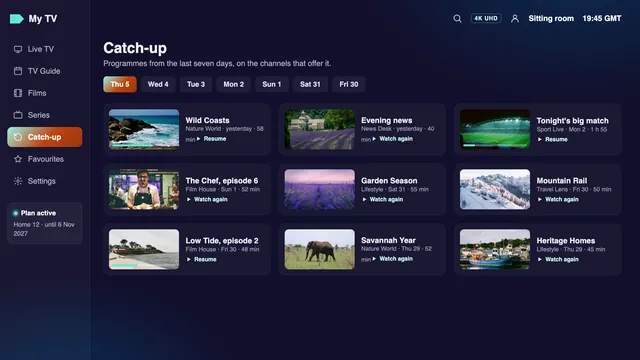
Catch-up from the guide. Scroll back through the guide of an archived channel to the programme you missed and press play. Archives usually go back up to 7 days; on channels without one, the earlier part of the grid is for reading, not playing. Shift workers and early risers get the most from IPTV catch-up: Saturday’s match or Tuesday’s episode is still waiting when they get in.
Ordering
Five steps, most of them on your phone, and usually over before the kettle has boiled twice.
Pick the IPTV plan that fits your months and screens. Tapping its button opens WhatsApp with the order typed out for you, the plan’s name and price, such as « Home 12 (12 months, €49) ». Rather use email? Write to [email protected] and name the plan.
A member of the team replies with a secure link. It takes debit or credit card or PayPal, and you enter your card details on the payment company’s page; they never pass through us.
Most online card payments in the EU need your bank’s go-ahead, known as Strong Customer Authentication and often called 3D Secure: a prompt from your banking app, or a single-use code by SMS. Confirm, and the payment is done.
Roughly 2 minutes once the bank confirms, day or night, the login message reaches WhatsApp or your inbox: the Xtream Codes lines, then the M3U and guide links, and the end date.
Open a compatible IPTV player, choose Xtream Codes and type the three lines in. Should a TV or stick resist, message the team and they will talk you through it, one screen at a time.
There is no basket on this site, no account to create and no card form anywhere here. Ordering is a short conversation: one message from you, one payment link from us, then the IPTV login. Questions before you pay are welcome, and an answer in English comes back at any hour.
Two details in your first message make the reply more useful: the TV, stick or box you will watch on, and a speed reading taken on it in the evening. With those, the team can name an IPTV player for your screen and say honestly what picture level to expect, before you spend a cent.
A real person handles every order, 24/7, before any payment link is sent. The login follows about 2 minutes after your bank confirms.
Payment and refunds
A single payment, nothing that renews, and a refund rule that fits in five lines.
Debit or credit card, or PayPal, in euro, through a secure link. No direct debit, and no card kept on file.
Expect an approval step, as with most online card payments in the EU. If the bank stops the payment, the fix is usually in its app or a call to its helpline.
Your IPTV access runs to the date printed in your login message. Nothing renews and nothing further is taken.
Counted from payment day. It applies if the login never turned up, or if every screen stays blank even after our help.
| Situation | Outcome | Reason |
|---|---|---|
| No login message ever reached me | Refund, if asked within 7 days | Nothing was delivered |
| No screen in the house shows anything, despite the team’s help | Refund, if asked within 7 days | The plan cannot work in your home |
| It all works, but I no longer want it | No refund | The plan arrived and it plays |
| 4K is jerky on my line, but the speed for 4K was explained before I paid | No refund | Lower levels play; the line decides the ceiling |
| I ask 8 days or more after paying | No refund | The window is 7 days from payment |
Money refunded goes back to the card or PayPal account it came from. The rule is written here before you pay, so nobody has to guess what happens if an IPTV plan does not work.
Ordering again later. It works like the first time: a new order, then a fresh IPTV login from the team, which goes into the apps already on your screens. The players stay; only the details change.
A payment problem with any seller. Raise it with the seller first. With a debit or credit card, your card issuer may be able to claw back a card payment for a service that never came; this is called a chargeback, and time limits differ from bank to bank. For PayPal, read PayPal’s current terms for yourself rather than trusting a seller’s summary. The CCPC’s guidance for consumers is a sound place to check where you stand.
Customer reviews
Six reviews from customers in Ireland, printed word for word.
★★★★★
Great selection of Irish, UK and international channels. I particularly enjoy the sports and entertainment categories.
★★★★★
Really good variety of movies and TV series. The VOD library has plenty of different genres to explore.
★★★★★
I use IPTV Smarters on my Fire Stick. The setup instructions are straightforward and easy to follow.
★★★★★
I was looking for Irish and international television in one place. The range of available programmes is interesting.
★★★★★
A nice selection of sports, movies and documentaries. Plenty of entertainment options to explore.
★★★★★
I particularly enjoy the movie selection and international channels. There is something different to browse every time.
FAQ
IPTV is television delivered over the internet: an app on your screen signs in to a server and plays live channels, a 7-day guide, catch-up and films on demand, with no aerial, dish or cable involved.
A screen that runs a player (smart TV, stick, box, phone, tablet or computer), a login, and a line that holds steady, from 5 Mb/s (HD) up to 25 Mb/s (4K), with Full HD at 10. Nothing goes on the roof, and a TV that runs a player needs no box.
Both use the internet. In everyday speech, though, IPTV means live channels with a guide and catch-up, opened in whichever player you like with a login, while most streaming apps are libraries locked to one company’s own app. A Home plan carries both the live channels and a library.
A single message, around 2 minutes after the payment goes through, on WhatsApp or by email. It contains three Xtream Codes lines (username, password, server URL), a playlist link in M3U format, a link for the listings and your end date.
Pick Xtream Codes whenever the IPTV player has that option: listings, catch-up and films each get their own section that way. The M3U link is for VLC, Kodi and TV apps that will only take one playlist link.
That depends on the screen. Smarters Pro covers iPhone, iPad, Apple TV and Android phones, tablets and TVs; TiviMate suits Android TV and Fire TV; many Samsung and LG sets use Smart IPTV or IBO Player; on a computer, VLC or Kodi. None of these apps is ours.
No. 4K UHD is the highest level, and only channels and titles made in 4K reach it, on a line and devices that can carry it. Everything else is HD or Full HD; the source decides which. HDR and Dolby Atmos need all three: a source that has them, a player that handles them and a TV that shows them.
Yes. Winter listings run on GMT; from March’s last Sunday to October’s last Sunday they run on Irish Standard Time. If a player shifts everything by an hour, change its « EPG time offset ».
Four prices, each paid once in euro: €29 for Home 3 (three months), €49 for Home 12 (twelve months), €79 for Home 12 Duo (twelve months, two screens together) and €89 for Home 24 (twenty-four months). Nothing renews.
Home 12 Duo is the two-screen plan: two TVs can play at the same moment for a year. The other three are one-screen plans. Whichever you pick, it covers a single household.
The login stops working on its end date, and you pay nothing further. If you want more, order again; a fresh login arrives and goes into the same apps.
When you ask within 7 days of the payment and either the login never came or nothing at all would display, even with our help. Not covered: a change of heart, or a 4K picture your line cannot carry when the 4K speed was explained before you paid. The refund is paid back to the original card or PayPal account.
Yes, please do; it is also a fair way to size up any seller. Send a WhatsApp message, or an email to [email protected], saying which TV or stick you use and what speed it reads in the evening. Replies come in English, 24/7.
Guides
This page gives the overview. Each guide takes one part of it, from the login to the listings to a picture that will not load, and goes into the detail.
 IPTV guide
 IPTV guide
 IPTV guide
A year of IPTV on a single screen, about 13 cent a day. Order it on 6 November 2026 and it runs until 6 November 2027, then stops; there is nothing to cancel. The login should reach you about 2 minutes after you pay. If it never comes, or nothing will play on any screen, the 7-day rule returns your money.
Home 12: €4912 months · €4.08 a month
Order