IPTV guide
IPTV EPG: where the programme guide comes from and how to put it right
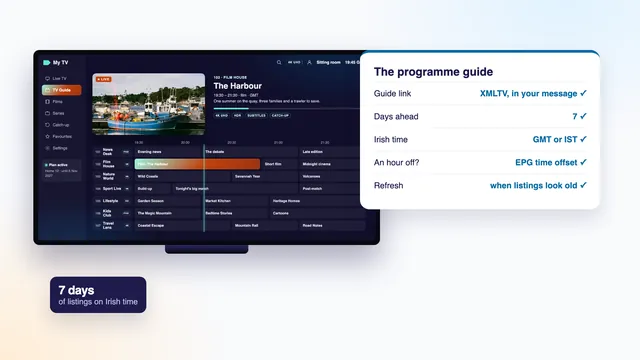
The IPTV EPG is the grid that tells you what is on each channel now, what follows, and what is coming over the week ahead. It arrives as data apart from the pictures, so it can go wrong by itself: empty rows, a guide that stops on Thursday, or every programme an hour out. This guide explains where the data comes from, how the player keeps it fresh, why Irish time catches it out twice a year, and how to pair up the channels the guide misses.
What an IPTV EPG is
EPG stands for electronic programme guide. Through an aerial or a cable box it travels in the same signal as the channels. With IPTV, which is television sent over the internet, the guide is a separate set of data that the player downloads and lays out on screen. Pictures and guide take different roads, which is why one can work while the other fails.
A player puts that data to use in three places:
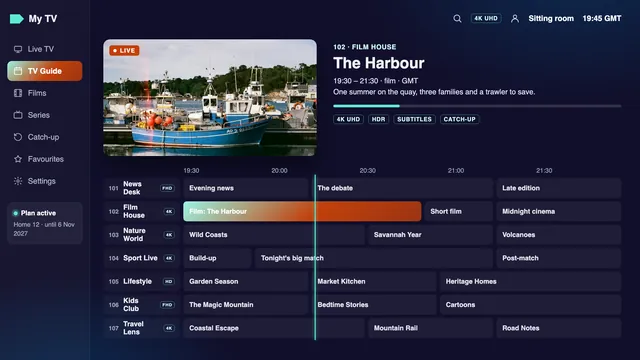
- The grid: channels down the left, hours along the top and one block per programme. Scroll right through the week and press a block to read its summary.
- The channel list: the programme on air now, often with a thin progress bar and the title of what comes next.
- The banner: the strip that slides in when you change channel, with the title and its start and end times.
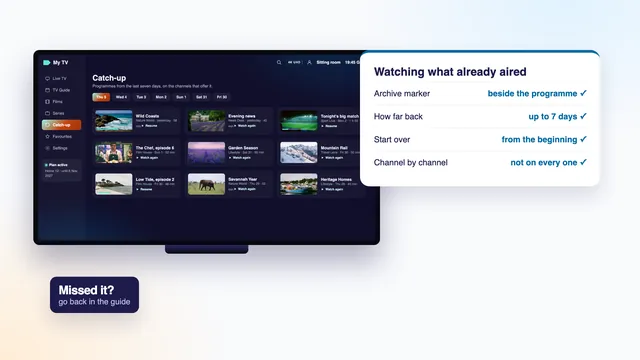
Each entry in the guide carries at least a channel, a title, a start and a finish. Most add a short summary, and some add a category, an episode number or a picture. The same data marks the past programmes you can still play on channels that keep an archive, which the guide to IPTV catch-up and the archive explains.
Where the guide data comes from
Your login message gives two ways in, and the right one depends on how the player is signed in.
With an Xtream Codes login: nothing to add
A player signed in with the three Xtream Codes lines (username, password and server URL) asks the same server for each channel’s schedule while it builds the list. There is no box to fill. Most players fetch the full week in the background on first start, which can take a few minutes with a long list, so allow a little time before deciding something is wrong. The guide to the three Xtream Codes lines shows where they go in each player.
With an M3U playlist: the XMLTV link
Apps that only read a playlist take the channels from the M3U link and the programme times from a second address, the guide link in your message. It begins with your server, as in http://your-server:port/xmltv.php?…, and carries your username and password after the question mark. Players label its box “EPG URL”, “XMLTV”, “EPG source” or “TV guide”. In Kodi, the PVR IPTV Simple Client keeps it among its guide options.
XMLTV is the format of that data: plain text laid out in a strict structure, with the list of channels at the top and then every programme, each tagged with its channel’s ID, its start, its stop and the time zone those times are in. Because each time states its zone, a correctly set player shows every programme at the right local hour.
One guide source per profile
Some playlist players accept more than one guide source. Add only the link from your message: two sources covering the same channels can compete for the rows and leave titles under the wrong channel.
Refreshing the guide and the 7 days it holds
The guide is a rolling window. Every day the server adds a fresh day at the far end while the day just gone drops off the near end, so a newly loaded guide reaches 7 days ahead. The player, though, keeps its own copy, and that copy only moves forward when it refreshes.
- Automatic refresh: most players reload the guide at start-up or every so many hours. In the settings, look for “EPG update”, “update interval” or “refresh guide on start” and choose once a day.
- Refresh by hand: the same menu usually holds “Update EPG” or “Reload guide”. Use it after the clocks change, after a new login, or whenever the grid looks stale.
- Reload the profile: in players signed in with Xtream Codes, reloading or editing the user profile pulls in the channel list and the guide again.
An IPTV EPG that shows full days up to a certain point and then nothing at all has stopped refreshing. The window on the server still runs 7 days; the player simply has not asked for the newer ones. Switch automatic refresh on, and if the app only refreshes while it is open, start it once a day.
Big lists on small devices
With over 40,000 live channels, a full week of programmes is a heavy download. A stick short of memory may take several minutes over it, or close halfway. Hide the country groups you never open before the guide loads, so there are fewer rows to fill; where the app lets you limit the guide to favourites or to fewer days, do that on the weakest screens.
A guide an hour off: Irish time and the EPG time offset
The guide follows Irish time: GMT in winter, and IST, Irish Standard Time, one hour ahead, in summer. In 2026 IST ran from 29 March to 25 October. On 6 November 2026, the date at the top of this page, the clocks in Ireland read GMT, and IST starts again on 28 March 2027.
The player sets each programme against the clock of the device it runs on. When that clock or its time zone is wrong, every row slides by the same amount, nearly always exactly one hour. The causes, from most to least common:
- The device’s time zone is not Dublin. A stick set up with another country’s zone, or with a fixed “GMT” or “UTC” zone that never moves to summer time, sits an hour out from late March to late October. Make Dublin the zone in the device’s settings and let the network set the clock.
- The clock was set by hand. A manual clock stays put in spring and autumn. Switch it to automatic time, taken from the network.
- The player’s own offset is set. Many players have an “EPG time offset” or “guide shift” setting, counted in hours or minutes. Someone may have used it to hide a clock fault that has since been fixed, so the two now add up.
Work through them in that order and change one setting at a time. Only when the device shows the right local time and the grid still disagrees, set the EPG time offset to +1 or −1 hour (+60 or −60 where the player counts minutes). Then refresh the guide and compare a programme that has just begun with what is on screen.
After the clocks change
If you ever used the offset to correct a shift, look at it again on the last weekend of October and of March. An offset that suited the summer leaves the guide an hour wrong all winter, whereas a correct device clock with the offset at zero needs no attention at all.
A few seconds behind is normal
A live picture reaches you a little behind the broadcast itself: a few seconds as a rule, now and then up to about half a minute. A programme that seems to begin that much late is not a guide fault, and the offset should stay where it is.
Channels with no guide, and matching them
Across more than 40,000 channels, some rows will read “No information” or repeat one generic title all day. There are three usual reasons.
- The source sends no guide. Some channels, often smaller world channels or ones opened for a single event, carry no programme data at all. Their pictures play; the row stays blank.
- The IDs do not match. The guide files each programme under a channel ID, and the player pairs every channel in the list with an ID. When the two drift apart after a channel is renamed or moved, the row empties or fills with another channel’s programmes.
- The player has not caught up. A channel added this week may show no guide on your screen until the next refresh.
Matching a channel by hand
Some playlist players let you open a channel’s options and choose its guide entry from a list, under a name such as “EPG ID”, “TV guide channel” or “match EPG”. Search that list for the channel’s name, pick the entry whose programmes match what is on screen, and the player remembers the pairing. Players signed in with Xtream Codes usually match on the server side, so there the fix is to tell us.
When a channel you watch often has no guide, send the team its name exactly as your list shows it and the group it sits in, through the contact page. A match made on the server corrects it in every player at once.
Reminders and recording from the guide
The guide is also where you plan the week. What follows differs from player to player, so treat it as what to look for rather than exact menus.
Reminders
Highlight a programme later in the week, press OK or hold the select button, and look for “Remind me”, “Set reminder” or a bell icon. A notice pops up shortly before the start, usually with a button that switches to the channel. A reminder is stored by the player on that one device, so one set on a phone will not sound on the TV.
Recording
Some players record from the guide onto the device’s storage or a USB drive, sometimes as a paid feature of the app. Two limits apply. Storage fills fast: an hour of Full HD takes a few gigabytes, and 4K far more. And a recording draws a stream from the server exactly as watching does, so on a one-screen plan it counts as the screen in use.
On channels with an archive, catch-up often makes recording unnecessary: the programme waits on the server for up to 7 days and nothing is stored at home.
Guide fixes at a glance
Most faults in an IPTV EPG show one of a handful of symptoms. Find yours in the left-hand column.
| What you see | Usual cause | Fix |
|---|---|---|
| Every row empty after a new login | The first load of the guide has not finished | Leave the player open for a few minutes, then reload the guide |
| Every row empty in a playlist app | No guide link added, or a mistyped one | Paste the guide link from the login message into the EPG or XMLTV box |
| Programmes all shifted by an hour | Wrong time zone on the device, a clock set by hand, or a leftover offset | Choose Dublin and automatic time, set the offset to 0, adjust by one hour only if still needed |
| The grid stops after two or three days | Automatic refresh is off | Turn on a daily refresh, or reload the guide by hand |
| One channel shows another channel’s programmes | Its guide ID points to the wrong entry, or two guide sources overlap | Match the channel again by hand, or remove the extra source |
| A few channels always read “No information” | No data from their source, or an ID that matches nothing | Send the team the channel’s name and group |
| The app freezes while the guide loads | Too many channels for the device’s memory | Hide unused groups, limit the guide where possible, clear the app’s cache |
| Catch-up opens the wrong programme | Guide times out of step with the device clock | Fix the time zone and the offset first; catch-up follows the guide |
When the guide is fine but the picture is not, the trouble lies elsewhere: the checklist for when IPTV stops working follows the path from the login to the screen. Still stuck after the table? Ask the team on WhatsApp; they answer 24/7, in English.
The guide’s terms in plain words
EPG
Electronic programme guide: each channel’s schedule, shown as a grid, in the list and in the banner.
XMLTV
The text format the guide data is written in, and the name players give the link that delivers it.
Guide link
The address in your login message that a playlist app needs for programme times.
Channel ID
The tag that pairs a channel in your list with its rows in the guide.
EPG time offset
A player setting that moves every programme by a fixed number of hours or minutes.
GMT and IST
Greenwich Mean Time in winter; Irish Standard Time, one hour ahead, in summer.
Catch-up
Programmes that have already aired, kept on the server for some days on the channels that offer it.
Every Home plan includes the 7-day guide, loaded with the Xtream Codes login and also given as a separate link; lengths, screens and prices are compared on the plans and prices page. To set up a new screen with the guide on Irish time from day one, follow the setup steps for each screen, and for the bigger picture, see how IPTV reaches a television on the home page.
Frequently asked questions
Why is my IPTV EPG empty?
Usually the guide has not finished loading or, in a playlist app, the guide link was never added. Give a new login a few minutes, reload the guide from the settings, and check that the EPG box holds the link from your message.
How many days does the guide show?
It reaches 7 days ahead and is renewed on the server every day. If your grid ends sooner, the player’s copy is old: turn on automatic refresh or update the guide by hand.
Why is every programme an hour out?
The device’s time zone or clock is the usual cause, often a fixed GMT zone that ignores summer time. Set the zone to Dublin with automatic time, leave the player’s offset at zero, and change it by one hour only if the guide is still out.
Is the XMLTV link needed with an Xtream Codes login?
No. A player signed in with Xtream Codes collects the guide from the same server on its own. The link is meant for apps that open the M3U playlist.
Can I set a reminder on my phone for the TV?
Usually not, because reminders are kept in the player on each device. Set the reminder in the player on the screen where you plan to watch.
Does the guide show in VLC?
VLC plays the channels from the M3U playlist but has no programme grid for it, so you see names without times. For a guide, open the login in a dedicated player such as IPTV Smarters Pro or TiviMate.