
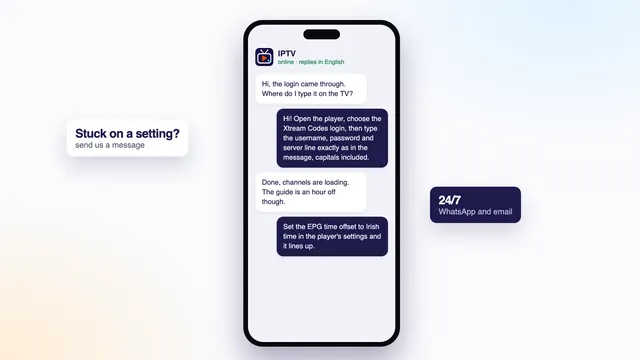
Fastest for setup. Photograph the screen, try the change the team proposes, and carry on in the same thread until a channel plays.
Contact
Contact IPTV: WhatsApp or email, at any hour
Every message to IPTV reaches the team in Dublin and is answered 24/7, in English. WhatsApp suits the moments when you are standing at the TV and want short replies; email to [email protected] suits anything you want in writing, a refund request for example. There is no limit on questions before you order, and nobody will hurry you into paying.
Get in touch
WhatsApp, email, and where orders start
Good for anything you may want to point back to later: a refund, a payment question, confirming an end date. Naming a plan in an email is also a way to order.
Ordering
Choose a plan on the plans page and tap its button; the message writes itself. No money moves until you open the payment link the team sends.
One message, one answer
What to include so the first reply helps
| Your message is about | What to put in it | Send it by |
|---|---|---|
| Which plan to take | The number of screens playing at once, the device on each, and the type of broadband | WhatsApp or email |
| Ordering a plan | Just the plan’s name, which its button writes for you | The plan’s button |
| A login that fails | Device, player, the exact error, and a photo of the screen | |
| Freezing or a soft picture | The time of day, cable or Wi-Fi, and a speed result from that same device | |
| The guide or catch-up | Which channel, the time the guide gives and the time on your phone | |
| A refund | The payment date, the method (card or PayPal) and a note on each screen |
Keep card numbers, bank logins and passwords for other accounts out of every message, ours or anyone else’s. Card details belong only on the payment page our link opens, which the payment firm runs. If something fails, quoting the username from your login message is fine, and it lets us find the order quickly.
Before ordering
Before you pay: questions to ask, and our answers
| Your question | The answer for our plans |
|---|---|
| Can my TV run a player? | Tell us the make, the model and the year. Recent smart TVs usually have one in the built-in store; older Samsung and LG sets, from before about 2018, may need a stick or a box plugged into HDMI. |
| How many screens at the same time? | One with Home 3, Home 12 or Home 24; two with Home 12 Duo. Three or more at once is not covered by any plan. |
| Is my broadband fast enough? | HD: 5 Mb/s or so. Full HD: near 10. 4K: near 25 for each screen. It must hold steady, so take the reading on the TV or stick, never on a phone. |
| What happens when the plan runs out? | The login stops working on its end date, which your message states. Nothing renews; a new order means a new login. |
| And if nothing works? | Within 7 days of paying you can request a refund, when no login arrived or nothing showed on any screen despite our help. |
| How do I pay? | A single euro payment through a secure link that accepts debit or credit card or PayPal. |
Ask any seller you are weighing up the same things. Other signs to be wary of: a seller who will take nothing but crypto, gift cards or bank transfers; plans sold as « lifetime » with no end date in writing; refund terms without a set number of days; star ratings with nothing readable behind them.
Our own answers in full are on the page of Home plans, with the price, length and end date of each.
Refunds
Refunds: when they apply and how to ask
Send an email to [email protected] within 7 days of paying. There are two grounds: the login message never came, or not a single screen in the house showed anything, even once the team had tried to help.
Outside the rule: changing your mind, and 4K labouring on a line whose speed was explained before payment. An agreed refund is returned through the original payment method, card or PayPal.
Read the complete terms in the refund policy. Please come to us before your bank; a message usually sorts things out faster, and a chargeback is meant for sellers who stop answering.
A refund email needs
- The date of payment, and card or PayPal
- Which device and player each screen uses
- What each screen did, with a photo if you have one
- The username from the login message
When we answer
Answer times, nights and weekends included
There is no closing time. A message sent at 23:40 on a Sunday is read the same way as one sent at noon on a Tuesday, and a late-night order still brings its login about 2 minutes after payment.
The answer may already be on the site: the setup page has a table of first-day problems, the guide to IPTV not working goes through the checks in order, and the IPTV guides cover each player and each line of the login message.
FAQ
Contact questions, answered
Is it fine to ask things before ordering?
Of course. Describe the screens, the devices and the broadband, and the team will name the plan that fits, or say honestly if your setup is likely to struggle.
What time can I message?
Whenever suits you. Messages are read at all hours (24/7), at weekends and on bank holidays too.
Can I order by email?
Yes. Write to [email protected] with the plan’s name. The payment link then reaches you by email, and later the login message too.
Will you ask for my card number?
No. Card details are entered only on the payment firm’s page that our link opens. We never ask for a card number, a bank code or another account’s password in a message.
Can you walk me through setup?
Yes, by WhatsApp or email, one screen at a time. A photo at each step speeds it up.
A question costs nothing: ask before you order
Name the TV, the broadband and how many screens run together, and you will get a straight answer. When you are ready, each of the four Home plans carries an order button; the login lands roughly 2 minutes after you pay.